The Itch
I keep running into a problem with my vocational assets: I know they could be better managed, but time and cost get in the way. My personal blog is a good example. For years, it sat on an aging Jekyll stack, accumulating technical debt while I told myself I’d get to it eventually. When I finally did — with AI tools doing the heavy lifting — weeks of backlogged work were reduced to hours. I wrote about that experience in three posts: Modernizing an Old Jekyll Blog with GitHub Actions and AI, AI-Assisted Modernization: Two Days, Ten Years Strong, and Fun at Scale. Each one started with a friction point and ended with something new and fresh.
That itch didn’t stop at my own blog. My wife Elena runs a graphic design business at skrinakcreative.com, and I’ve managed the technical side of her web presence since I’ve been building Drupal websites. We’d been on Squarespace for years — it worked, but we no longer needed the full service. I wanted to keep her web presence without a subscription. The problem was clear enough. What wasn’t clear was whether AI tools could handle a migration of this kind, given the countless ways such projects can get off track.
My prior projects led me to try. Skepticism noted, then set aside. I spun up a new project anyway.
The Situation
Elena’s practice is referral-driven. She’s never aggressively pursued new work — clients find her, and she enjoys the work that comes to her. That model served her well for decades, and her website reflected it: a portfolio site, essentially a brochure, designed to make a strong impression on anyone who looked her up. It didn’t need to do much else.
I built her first site on Drupal, which made sense given my day job. When my time to support it thinned out, we moved her to Squarespace. That was the right call at the time. Squarespace gave her a polished, self-sufficient platform she could rely on without having to lean on me for every update. We were happy with it.
Over time, as her referral work lessened, so, too, did our need for Squarespace. We no longer need the same level of dynamic updates as before. All she needs now is a fast, reliable online presence that maintains its professional look and is low-effort for me to maintain. A static site is the right tool for that.
The First Instinct
My first move was HTTrack. I know the tool well — it’s a capable web crawler that replicates a site to local storage, rebuilding link structures so you can browse offline. For a straightforward static site, it’s a reasonable starting point for a migration. I’d used it before. I knew what it could do.
What followed was less straightforward. I ran multiple attempts with AI assistance, tweaking HTTrack’s extensive runtime parameters each time — options related to JavaScript capture, CSS handling, and self-hosting of external references. It was whack-a-mole. Accommodating one use case would break another. Fix the stylesheets, lose the fonts. Capture the scripts, break the gallery. No matter what I tried, I could never generate a site capture that didn’t still point back to Squarespace in some form.
That result pointed to something I hadn’t thought about going into the project. Squarespace is a feature-rich platform and not just a hosting solution. It’s obvious in hindsight, so bear with me here. Squarespace tightly manages its themes, fonts, and interactivity. HTTrack doesn’t render URLs via JavaScript, so it can miss client-side artifacts, such as galleries, navigational elements, lightbox-like behaviors, and so forth. These are missing or broken in the static capture. While I was able to retrieve a copy of her site, the trailing dependencies would break once we canceled her subscription.
That’s when the IP question surfaced. Even if I could have captured a truly decoupled copy, was I infringing on Squarespace’s IP (Intellectual Property)? Which of their themes or other bundled components would I be using illicitly? I knew using Adobe Fonts would be improper. Rather than go down that rabbit hole, I chose to “roll my own” and start from scratch. That decision shaped what comes next.
The Discipline
Documentation has always been the foundation of complex project management. I’ve long known this. My personal temperament, however, runs toward play and discovery, which has always sat at odds with strict documentation discipline. AI bridges that gap in a way I didn’t expect. It lets me be playful while leaving a breadcrumb trail of how I got there, which was just outside my natural discipline to maintain on my own.
My previous work with AI-mediated blog migrations taught me this directly. AI has no persistent memory between sessions. This is something we humans take for granted, and we know how that can lead to undesirable results. With documentation as a project’s guardrails, AI’s probabilistic method will lead you to more frenetic results. The fix is simple but specific: lead with documentation, starting with broad strokes and working down to the details. Remind AI to update documentation and AI instructions, especially when it produces a wrong answer. Think of it as the modern equivalent of hitting Ctrl+S obsessively — always refer back to the project documents.
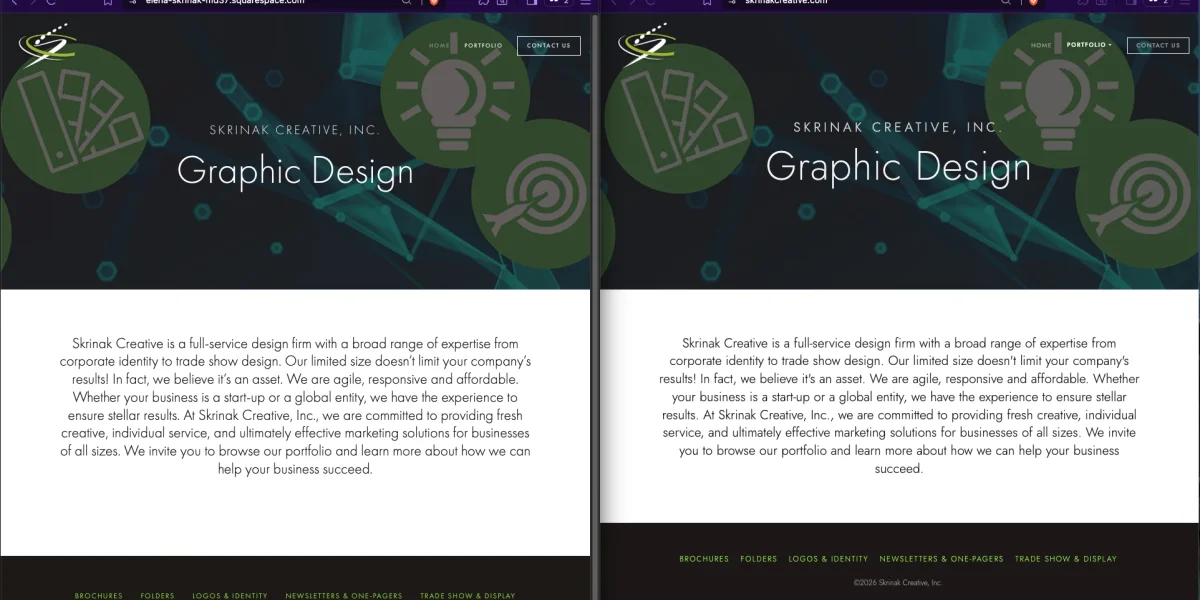
Now baptized into this mindset, I started from the macro. I prompted Claude Code to define scope and deliverables: 7 pages, 1 grid-based theme, a known asset inventory, and 1 integration to import. After this definition, we proceeded to extract the design specifications from the Squarespace website: color tokens, typography, spacing values, and banner dimensions. I had prompted Claude to set visual tests as well. We captured a visual baseline of the current site and used it for our iterations. We tested across desktop and mobile, and defined what was acceptable, using Playwright for the capture and comparison. We did so before the migration began.
That groundwork is what made AI reliable rather than chaotic. Insufficient context isn’t humility — it’s a failure to do your job. When I’ve been lazy in AI interactions, I’ve actually been providing too little to work with. My playful instinct is fine. The breadcrumb trail is what makes it recoverable.
The Stack
Claude Code’s first suggestion for a target framework was Hugo. I’ve used Hugo before and respect it, but it wasn’t my druthers after using Astro. Having worked with Astro on my blog migration, I’ve developed a bias toward it — its build speed alone is enough to make me happy, and for an image-heavy design portfolio, its native image optimization is the right tool for the job. Astro handles WebP conversion, lazy loading, and responsive srcsets without extra configuration. For Elena’s site, images are the product. That settled it.
For hosting, I wanted to evaluate Cloudflare Pages. I hadn’t used it before, and this was a low-risk opportunity to do so. I’m well pleased with it. The free tier offers solid infrastructure, global CDN, automatic HTTPS, and git-based deploys. I’m not entirely clear on Cloudflare’s business case for offering this freely — my guess is it draws developers into their ecosystem, with some percentage eventually using paid services. Whatever the reason, I’m not complaining. The caveat worth naming: Cloudflare can change that calculation at any time, which would force a hosting decision. It’s a different flavor of vendor dependency than Squarespace, but a dependency nonetheless. The cost of being wrong is low — migrating away from a free service is a different problem than canceling a paid one.
For the theme, the right call was no theme at all. Existing Astro portfolio themes all required more adaptation than building clean from scratch — the difference between their layouts and Elena’s design was too large. A blank Astro starter, shaped to spec, was the familiar instinct. Anyone who has worked with any blank CMS theme will recognize the logic.
The remaining decisions followed from the project’s needs. GLightbox matched the gallery behavior Elena’s site already had. Jost, a geometric sans from Google Fonts, replaced Futura PT — Adobe Fonts licenses don’t survive a Squarespace cancellation, and Jost is close enough that most people won’t notice the difference. Elena caught the difference. We’ll get to that.
What Happened
Claude Code wrote everything. Every page, every layout, every style. My role was to manage the project and, in the visual alignment work, to be the eyes that Claude Code doesn’t have.
The build moved from broad structural decisions to progressively finer detail. Early in the process, automated visual regression tests ran against the live Squarespace site, flagging layout differences at a gross level. As those resolved, the work shifted to subtler corrections — spacing, alignment, proportions that the tests could confirm but that I had to identify first. Claude Code can apply a pixel value precisely. It can’t see that the banner is two pixels too tall. That part was mine. I’d identify the discrepancy, measure it, and feed it as definite input. Claude Code applied it. The test suite confirmed the fix. We moved on.
This iterative loop — observe, direct, execute, verify — is what the documentation discipline made possible. Without the test suite, corrections would have been subjective and hard to confirm. Without the documentation, each session would have required re-establishing context. Without the scope definition, the work would have had no natural stopping point.
When I thought the site was ready, I called Elena over. Her reaction was immediate and, for her, uncharacteristically carefree. She approved it. I flagged the font substitution myself — Jost standing in for Futura PT — and she accepted the tradeoff without objection. Her standards are exacting. She held me to the same standard she’d hold anyone she worked with. That she was satisfied mattered.
The Numbers
The project took about eight hours. Roughly one of those was due to a DNS configuration issue that Claude Code didn’t catch.
At this point, I expected that reconfiguring DNS would be simple enough. Cloudflare already “knew” my current zone record configuration and had captured it. My plan was to migrate the nameservers to Cloudflare, add a custom domain configuration in CF Pages, and wait for propagation. As a side note, I hate the whole “Wait 48 hours for changes to reflect” thing, but you can query for confirmation right away rather than let a bad zone record munge things up. Back on point, I made the mistake of only adding skrinakcreative.com and not including the www. prepended version as well. Claude was completely blind to this miss and suggested every possible fix, except this one. Interestingly, I left the project, and it was in my idle time that my experience kicked in. I caught my error and added the missing custom domain, fixing the issue. A junior technologist might have spent considerably longer on that, or not found it at all. Some things only come from having broken them before.
Lighthouse performance improved from 57 to 86. The remaining scores held or improved across all seven pages. The site is faster, leaner, and free of a subscription. Those were the goals.
Project Scope
This was a tightly scoped project. Seven pages, one theme, a known asset inventory, one integration swap. The scope was defined precisely because I knew what I was taking on.
But what counts as tightly scoped keeps expanding. Without AI assistance, a project like this simply wouldn’t have happened. I’ve been aware of AI-assisted migration tools for several years, and for most of that time, I was skeptical. The claims evidently outpaced the results. My blog migration projects moved me from skeptical to convinced. This project applied that conviction to something with real stakes.
The effort for this type of work is practical again at a small scale. I am free to truly manage a project while AI does all the small but vital information management to keep the project on scope and on task. AI does the execution while I keep judgment where it belongs. This is a whole new species of leverage, isn’t it? There’s no precedent in my line of work for this kind of acceleration. And this phenomenon is still new and rapidly changing.
Close
Elena approved the site. She wasn’t evaluating the process — she never needed to. She looked at it, and it met her standard.
I’ve been writing about this workflow for a year now, and the projects keep finding me. Not because I go looking for migrations to run, but because the itch surfaces when something I care about isn’t as good as it could be, and the cost of fixing it has finally dropped within reach. That’s what AI-assisted development has changed for me — not the desire to improve things, but the calculus on acting on it.
I still haven’t worked out the right balance between planning and surprise. Push too hard on structure and you’re just executing a spec. Let it go too loose and you’re debugging indefinitely. The productive zone is somewhere in between — structured enough to give AI what it needs, loose enough to let the work surprise you.
As far as what I will post next, I don’t know. Here’s a tease: I used a similar process in writing this very post. I’ve asked Claude to juggle the details while I rope it into a hopefully interesting narrative. Relatedly, an interesting video by Stephen Welch on how diffusion models generate imagery, from coarse structure to fine detail as we whittle away the “detail noise,” reinforces my discovery through practice.
For a more technical walkthrough of this migration, see my presentation on AI-Accelerated CMS Migration.
This post was developed collaboratively with Claude Sonnet 4.6 (claude.ai) in a single session, using the same iterative, AI-assisted approach described above.