AI-Accelerated CMS Migration with Claude Code
From Squarespace to Astro in eight hours
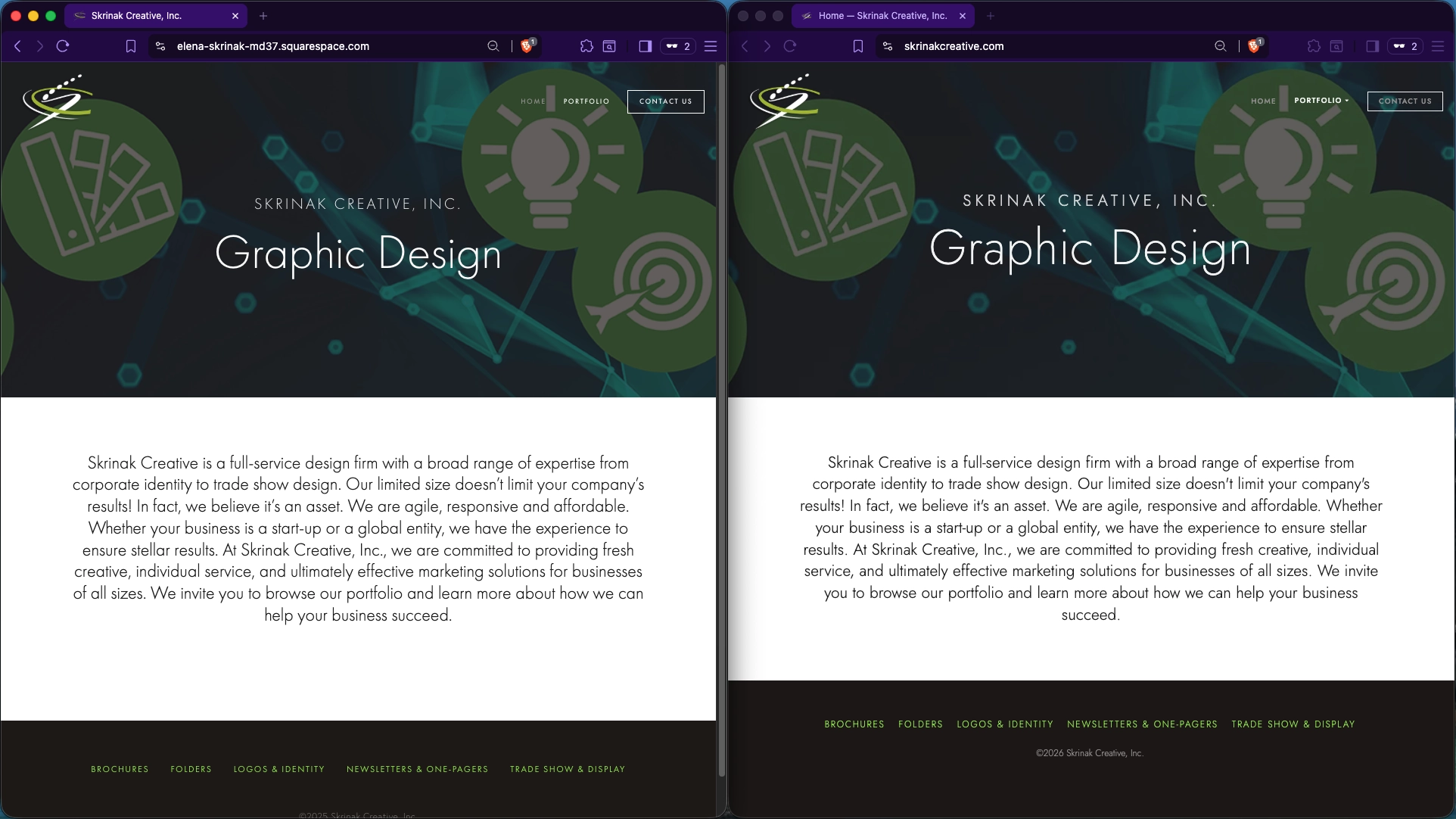
original site — migrated site
The Situation
My wife Elena runs a graphic design business — skrinakcreative.com
- On Squarespace since 2017
- Squarespace worked well
- Her business downsized
- Seven pages, portfolio galleries, minimal interactivity
- $16–23/month → $0
What I Considered First — HTTrack
Web scraping is the obvious starting point. I know HTTrack well.
- Used HTTrack + AI as a first attempt
- Results were unusable
- Platform-coupled assets would require significant decoupling effort
- Unclear IP standing on scraped theme assets
- Enough friction to make me curious about a cleaner approach
The Constraint — Know Your Scope
This was a simple migration. Knowing that upfront matters.
- 7 pages, single grid-based theme
- One integration swap: Google Maps → OpenStreetMap
- No forms, no authentication, no e-commerce
- No CMS data model to untangle
The Approach — Discipline Before Code
Classic project management applied to an AI-accelerated workflow.
Before any code was written:
- Plan — goals ranked by priority, options evaluated
- Scope — seven pages, exact asset inventory, known integrations
- Specification — design tokens, typography, color palette, spacing
- Testing requirements — visual regression baselines, pass criteria defined
The Stack Decision
Astro + Cloudflare Pages
| Decision | Choice | Rationale |
|---|---|---|
| Hosting | Cloudflare Pages | Free tier, global CDN, auto-deploy from git |
| Framework | Astro | Native image optimization, clean component model |
| Theme | None — built from scratch | Existing themes didn’t match Elena’s design |
| Font | Jost (Google Fonts) | Adobe Fonts license lost on Squarespace cancellation |
| Lightbox | GLightbox | Matched portfolio gallery behavior exactly |
What Claude Code Actually Did
Claude Code wrote all of it. My role was project management.
- Discovery & audit, technology evaluation, design spec extraction
- Astro scaffold, component build, gallery implementation
- Visual alignment, test suite, deployment configuration
The standout: Layout identification and visual alignment
Describing design corrections in plain English, with a visual comparison test suite confirming each change against the live Squarespace baseline.
The Test Suite
78 tests. Claude Code wrote them.
- 60 visual regression tests — 7 pages × 3 breakpoints × 2 test types
- 18 navigation tests — desktop and mobile, dropdown and drawer behavior
- Playwright baselines pulled from the live Squarespace site
I already take parallel test suite management for granted. That shift happened fast.
The Numbers
Total time: 8 hours — start to deployed.
- ~1 hour lost to a Cloudflare DNS configuration miss
- A clean run: probably 7 hours
| Metric | Squarespace | Astro | Δ |
|---|---|---|---|
| Performance | 57 | 86 | +29 |
| Accessibility | 96 | 99 | +3 |
| Best Practices | 100 | 100 | — |
| SEO | 93 | 92 | -1 |
The Results
Deployed. Stakeholder approved.
- Elena signed off — she cares about the design, not the tech
- Not pixel-perfect: font substitution accounts for most of the gap
- Better on every meaningful performance dimension
- Full control, no vendor lock-in
Project Scope
This was the simple case. Extrapolate carefully.
- 7 pages, one theme, one clean integration swap
- Complexity scales with forms, data models, authentication
- AI instructions fail — verify infrastructure configuration yourself
Prior assumptions about effort may no longer hold. Test it yourself.
The Takeaway
Context is the input. Quality is the output.
- Define scope before you start
- Write specs before you build
- Require tests before you ship
- Manage AI like a very fast, very literal contractor
The question isn’t whether AI can do this. It’s whether you can manage it well enough to let it.
Questions?
See it live
- skrinakcreative.com — production site, now running on Astro
elena-skrinak-md37.squarespace.com— original Squarespace site- Editorial note (2026-09-13): the original Squarespace site expired on September 12, 2026, and the link has been removed.
Read the full story
- From Squarespace to Astro: A Migration Story — full narrative with project context, decision-making process, and lessons learned
The stack